首页 / 讨论 / 屏幕意外分成两半?解锁 “秘密菜单 ”来修复!

查找答案、提出问题,并与我们的
世界各地的社区。.

首页 ' 论坛 ' 交互式白板 ' 屏幕意外分成两半?解锁 “秘密菜单 ”来修复!

  • 屏幕意外分成两半?解锁 “秘密菜单 ”来修复!

    发布者 Amdox on 26 12 月, 2025 at 9:35 上午

    Admins and teachers, have you ever encountered this strange glitch: the large screen display suddenly looks abnormal, showing a “Double Split Screen” effect as if the image has been cut in two? 🖥

    Don’t rush to report a hardware failure! This is usually just a mismatch in the low-level system display settings—the “Split Screen Mode” has been incorrectly set to “Single Partition”.

    To fix this, we need to access the hidden “Factory Menu.” Don’t worry, it’s safe and easy if you follow these steps:

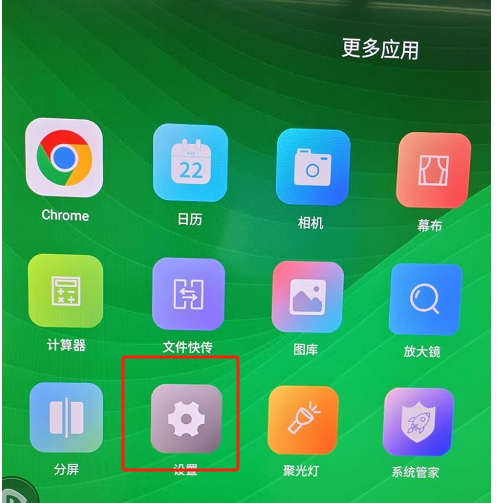
    Go to Settings: Click “More Apps” on the home screen and open “Settings” ⚙.

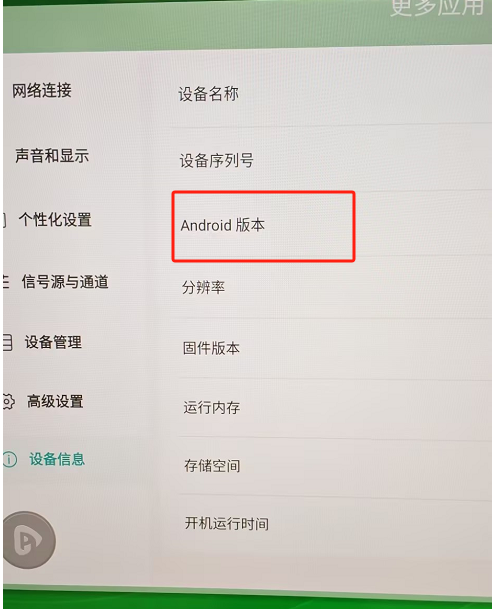
    Unlock the Hidden Menu: Go to “Device Info”. Find the “Android Version” line and tap it 6 times in a row. Voila! The “Factory Menu” will pop up! 🔐

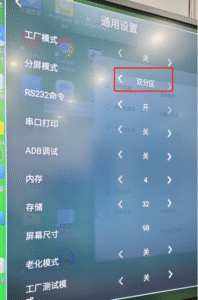
    Change Configuration: Inside the Factory Menu, click “General Settings”. Find the “Split Screen Mode” option and change it to “Double Partition”.

    Once set, exit the menu, and you’ll see your screen instantly return to a perfect full-screen display! You just fixed it like a pro! 🛠

    Amdox 答复 2 weeks, 5 days ago 1 名成员 - 0 条回复
  • 0 条回复

抱歉,没有找到回复。.

登录后回复。.

开始讨论
00 回覆 2018年6月
现在
Lv.
0 级别

追随者

后续行动

0

职位

我的简介

您必须登录后才能申请积分。.

通知

首页 ' 论坛 ' 交互式白板 ' 屏幕意外分成两半?解锁 “秘密菜单 ”来修复!

您必须登录后才能创建新的讨论。.