



-
OPS Mode Keeps Making “Ding” Sounds on My Interactive Display? Fixed It in 3 Steps—No More Disruptions!
When I was teaching using the OPS channel on my interactive display, I kept hearing this annoying “ding-dong” sound over and over again. It seriously broke the flow of my class 😤.
Turns out, the issue was caused by the network sharing mode being set to Soft Router. Here’s how I fixed it in just 3 steps:
Step 1
Switch the display to Android mode, swipe up from the bottom of the screen to open the menu, go to Settings, then tap Device Information.Step 2
On the Device Information page, tap Android Version 6 times to open the hidden factory menu.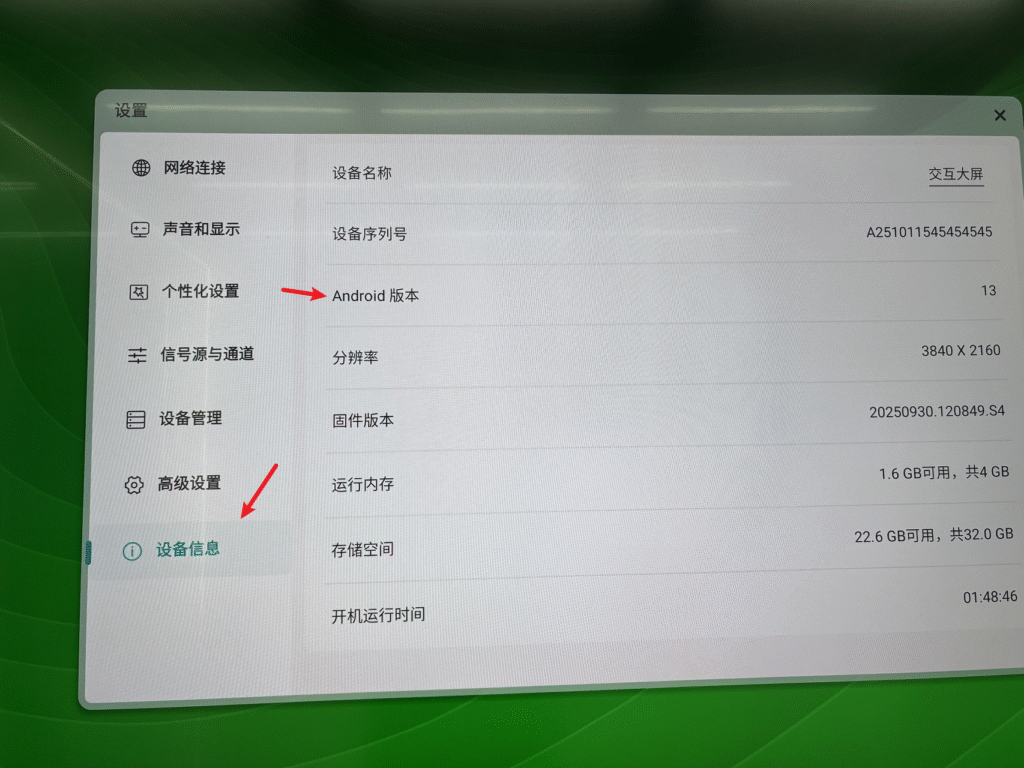
Step 3
In the factory menu, go to General Settings, scroll down to Network Sharing, and switch it from Soft Router to AP Mode.
That’s it—the notification sound disappears instantly!
After switching back to the OPS channel, I could finally teach in peace again. Highly recommend trying this if the sound is driving you crazy too 👍
Sorry, there were no replies found.
Log in to reply.
 English
  简体中文
简体中文 