



-
IWB Opens PPT with the Wrong App? Switch It in Seconds!
Teachers, do you have both Microsoft Office and WPS installed on your computer? 📂 It can be frustrating when you want to use WPS to present your slides in IWB, but the system automatically launches Office (or vice versa), messing up your layout and workflow! 😫
This happens because multiple file-opening programs are installed, and IWB hasn’t been told which one is your favorite yet. Don’t settle for the wrong app! You can actually specify your preferred PPT software directly inside IWB.
Take back control of your file opening method in just two steps:
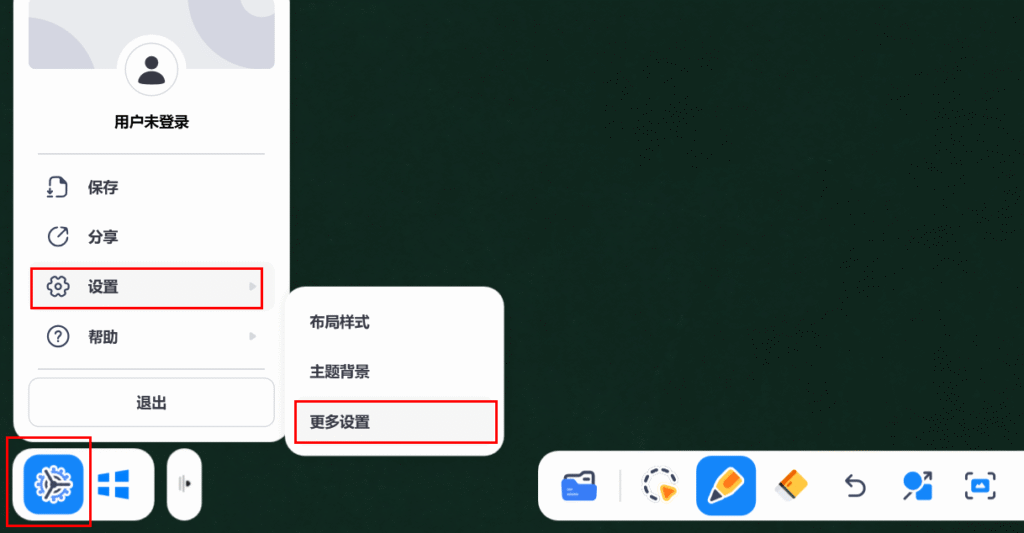
Open the IWB software, click the Settings icon ⚙ on the toolbar, select “Settings”, and then go to “More Settings”.
Find the “PPT Opening Method” dropdown menu 🔽. Click it and select the software you use most often.
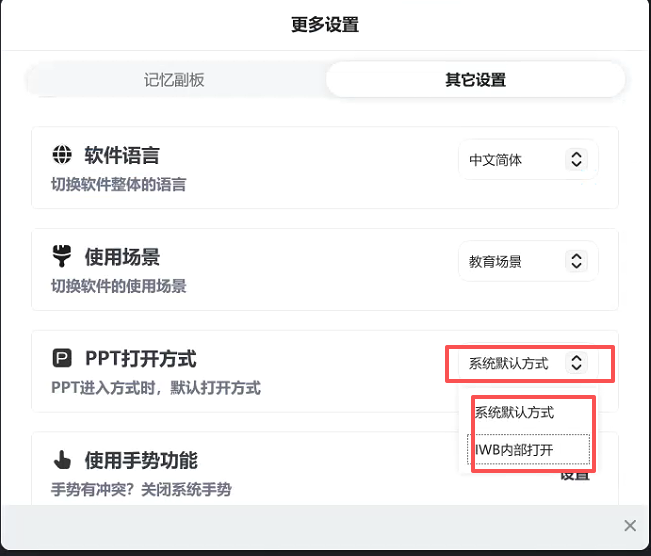
Once set, your slides will open in the interface you are familiar with. No more getting stuck on this little detail during class! 🚀
Sorry, there were no replies found.
Log in to reply.
 English
  简体中文
简体中文