



-
Teachers Must Read! One IWB Feature That Makes Smart Writing Ultra-Smooth!
Teachers, do you ever get frustrated when you have to constantly switch tools in the middle of a lesson—writing, then finding the eraser, then switching again to turn the page? It kills the flow of the class! 🤯
You are going to love the IWB Smart Writing feature. It is a total game-changer!
Here is how to set it up: Select the Pen Tool, click the Finger Option, and enable Gesture Recognition.
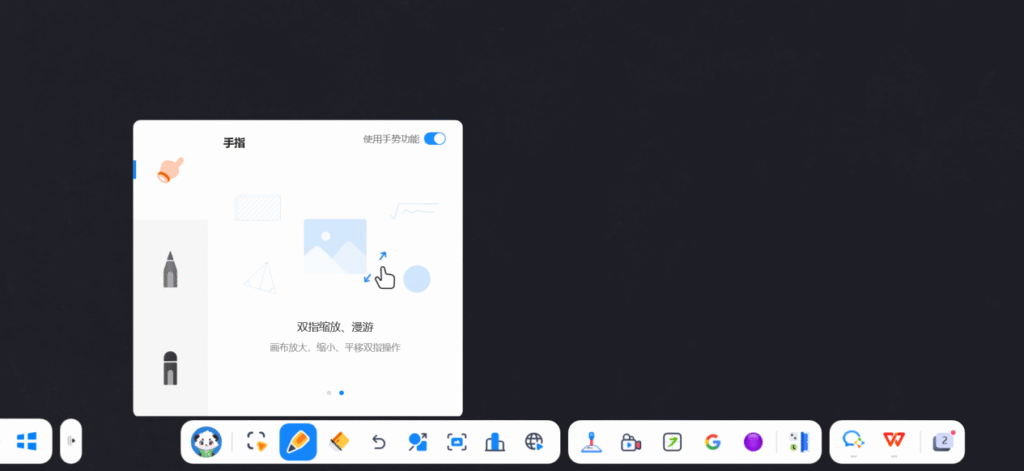
Smart Pen Detection: You can use the fine tip for detailed explanations, then flip the pen to use the thick tip for highlighting 🖍️. It keeps the main points clear.
Quick Undo & Erase: Made a mistake? Just hit undo. Need to clear a large area? Just place your palm on the screen and wipe. It clears the board instantly! 👋
Gesture Magic: We aren’t done yet! Your hand is a powerful tool too:
One Finger: Select objects or flip pages.
Two Fingers: Pinch to zoom in or out.
Slide: Drag to move the canvas so every student can see every detail.
Colorful Notes: Finally, switch pen colors at will 🎨 to make formulas and key steps pop. It speeds up student understanding and makes your class more efficient!
How cool is this “Pen-Finger Separation” experience? Go give it a try!
💬 Interaction: What is your favorite pen thickness and color combo for board work? Share your pro tips in the comments!
Sorry, there were no replies found.
Log in to reply.
 English
  简体中文
简体中文 