



-
IWB Interface Language Doesn’t Feel Right? Switch to Your Familiar Language in Seconds!
Teachers, have you ever accidentally switched the IWB interface to a language you don’t understand, leaving you confused by the text on the screen? 😵 Or perhaps you need to switch to a different language to suit a specific teaching environment?
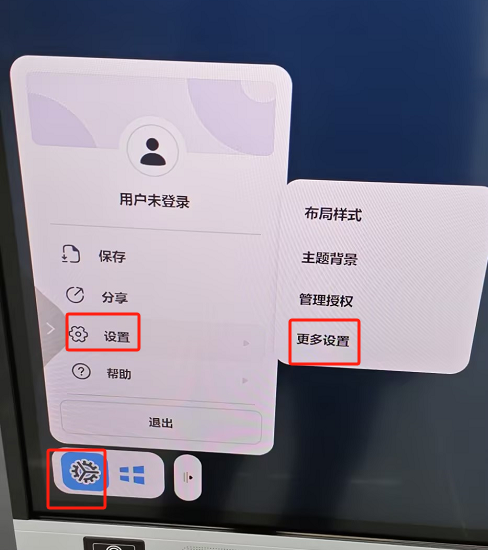
Actually, IWB supports easy switching between multiple languages; the setting is just hidden a little “deep” in the menu. Follow these steps to find it and switch to your preferred language:Open IWB, click the Settings icon ⚙ on the toolbar, select “Settings”, and then click “More Settings”.
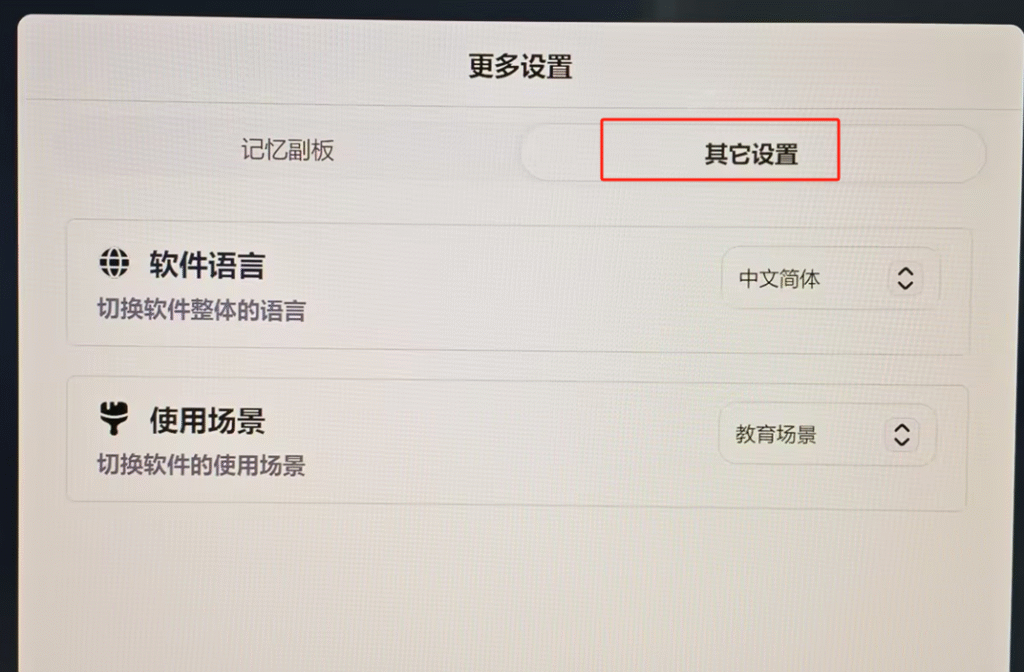
In the pop-up window, switch to the “Other Settings” 🛠 tab.
Find the “Software Language” dropdown menu 🔽. Click it and select the language you need. The interface will refresh instantly!
It’s that simple! No matter which language environment you need, you can switch anytime! 🌍
Sorry, there were no replies found.
Log in to reply.
 English
  简体中文
简体中文 