



-
DMS Device Group Grayed Out? Fix It Fast and Bind Devices Easily!
Many administrators have encountered this confusion when using the DMS console: you’ve created a device group, but it appears “grayed out” in the list. You can’t select it, let alone bind any devices to it! 🚫
Don’t panic, it’s not a system bug. It’s usually just a case of mistaken identity during setup. The reason is simple: the device group type was set to “Menu” (Directory), which is for organization only, not for binding devices.
To solve this, you just need to re-create the device group correctly. Follow these simple steps:
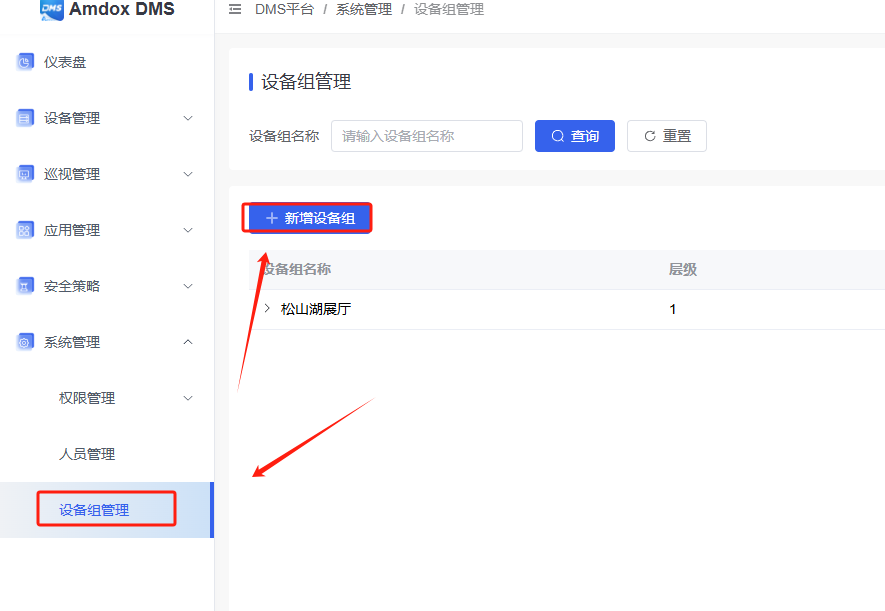
Log in to the DMS platform, go to System Settings > Device Group Management, and click Add Device Group.
Here is the key step! 📝 In the pop-up window, find the option “Is it a directory?” and make sure to select “No”.
Fill in the rest of the information as usual and click Confirm.
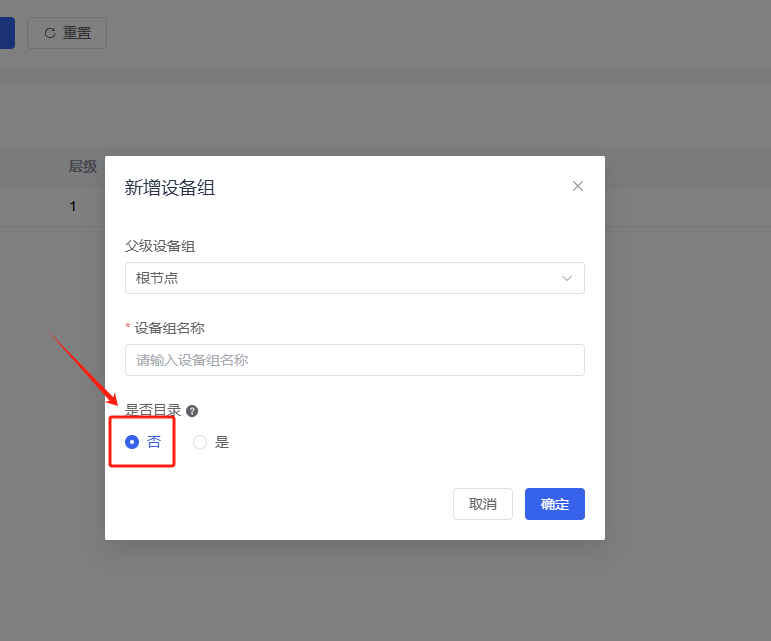
The new device group created this way will be active and ready to use. No more grayed-out boxes—go ahead and try binding your devices again! 🛠️
Sorry, there were no replies found.
Log in to reply.
 English
  简体中文
简体中文 