



-
Screen Split in Half Unexpectedly? Unlock the “Secret Menu” to Fix It!
Admins and teachers, have you ever encountered this strange glitch: the large screen display suddenly looks abnormal, showing a “Double Split Screen” effect as if the image has been cut in two? 🖥
Don’t rush to report a hardware failure! This is usually just a mismatch in the low-level system display settings—the “Split Screen Mode” has been incorrectly set to “Single Partition”.
To fix this, we need to access the hidden “Factory Menu.” Don’t worry, it’s safe and easy if you follow these steps:
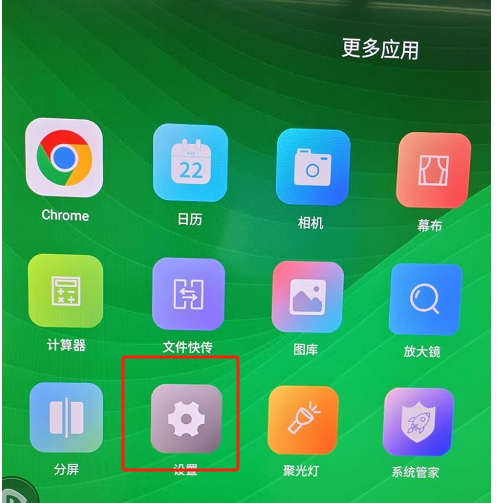
Go to Settings: Click “More Apps” on the home screen and open “Settings” ⚙.
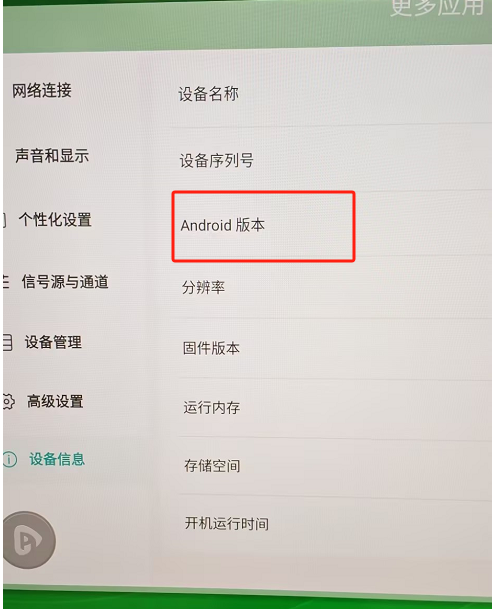
Unlock the Hidden Menu: Go to “Device Info”. Find the “Android Version” line and tap it 6 times in a row. Voila! The “Factory Menu” will pop up! 🔐
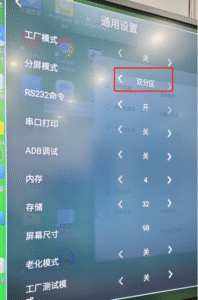
Change Configuration: Inside the Factory Menu, click “General Settings”. Find the “Split Screen Mode” option and change it to “Double Partition”.
Once set, exit the menu, and you’ll see your screen instantly return to a perfect full-screen display! You just fixed it like a pro! 🛠
Sorry, there were no replies found.
Log in to reply.
 English
  简体中文
简体中文 