



-
Forgot Your USB Before Class? Here’s How I Use IWB to Pull Up My Lesson Files in One Step!
We’ve all been there: you’re about to start class, only to realize you left your USB drive behind. Cue the panic as you scramble to find your materials! 🤯 This time, I’m introducing the IWB Smart File Manager. With just one login, you can access all your resources and keep your lesson flowing perfectly.
Here’s how it works: Open the Smart File Manager (click the file icon as shown).
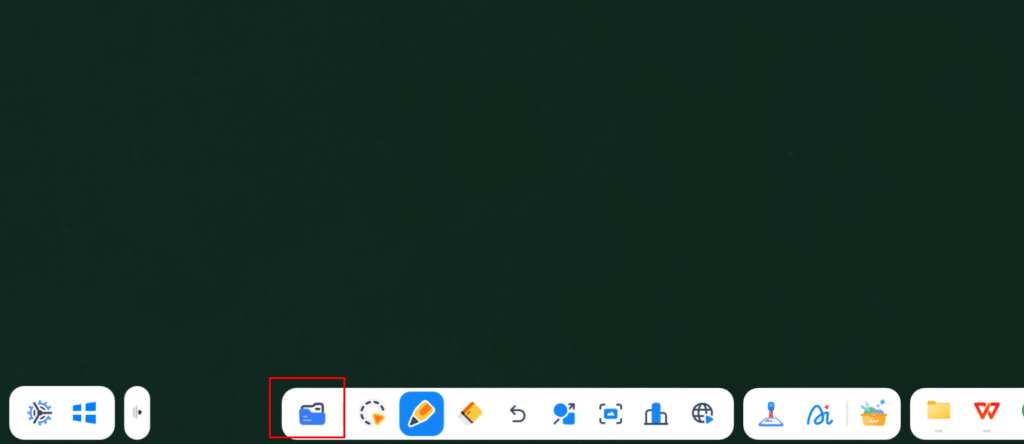
Local & Cloud Storage at Your Fingertips: Browse local files on the right, or log in to your personal account on the left to access My Drive and your linked cloud services (OneDrive, Google Drive, etc.) instantly.
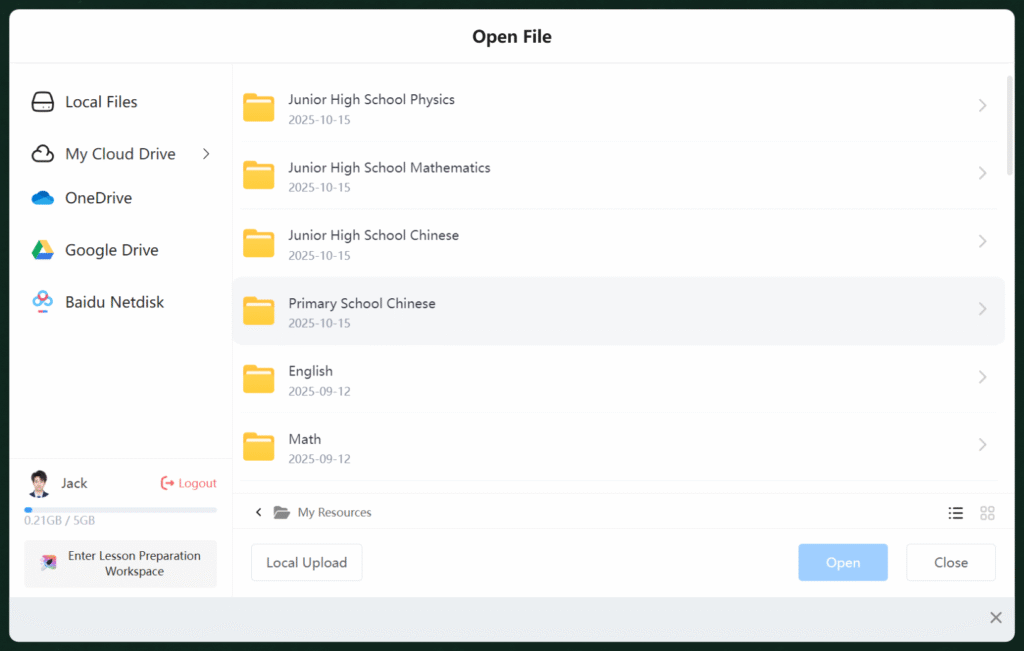
Seamless Teaching Experience: Pull up files directly from the cloud without digging through folders. Your lesson stays organized and continuous—no more awkward pauses while searching for a lost document. ⚡
How cool is that? Switching between files and opening courseware is now a one-step process. Your students get a clear, uninterrupted learning experience. Ready to embrace a more flexible way of managing your files? Give it a try!
💬 Interaction: What type of resources do you rely on most for teaching? PowerPoints, videos, or interactive web tools? Share your management tips in the comments!

Log in to reply.
 English
  简体中文
简体中文